About ninety seconds each: everything you get for free, and everything Orbit adds. Every note in Astro Notes is sealed on your device before it leaves — the films show the app, never your keys.
Start writing — free, no email required →
The free tour
Write, tag, search, sync, and export — the whole free plan, sealed on your device.
The Orbit tour
What Orbit adds: every version kept, your crew writing live, and five times the room.
Every feature, on one screen
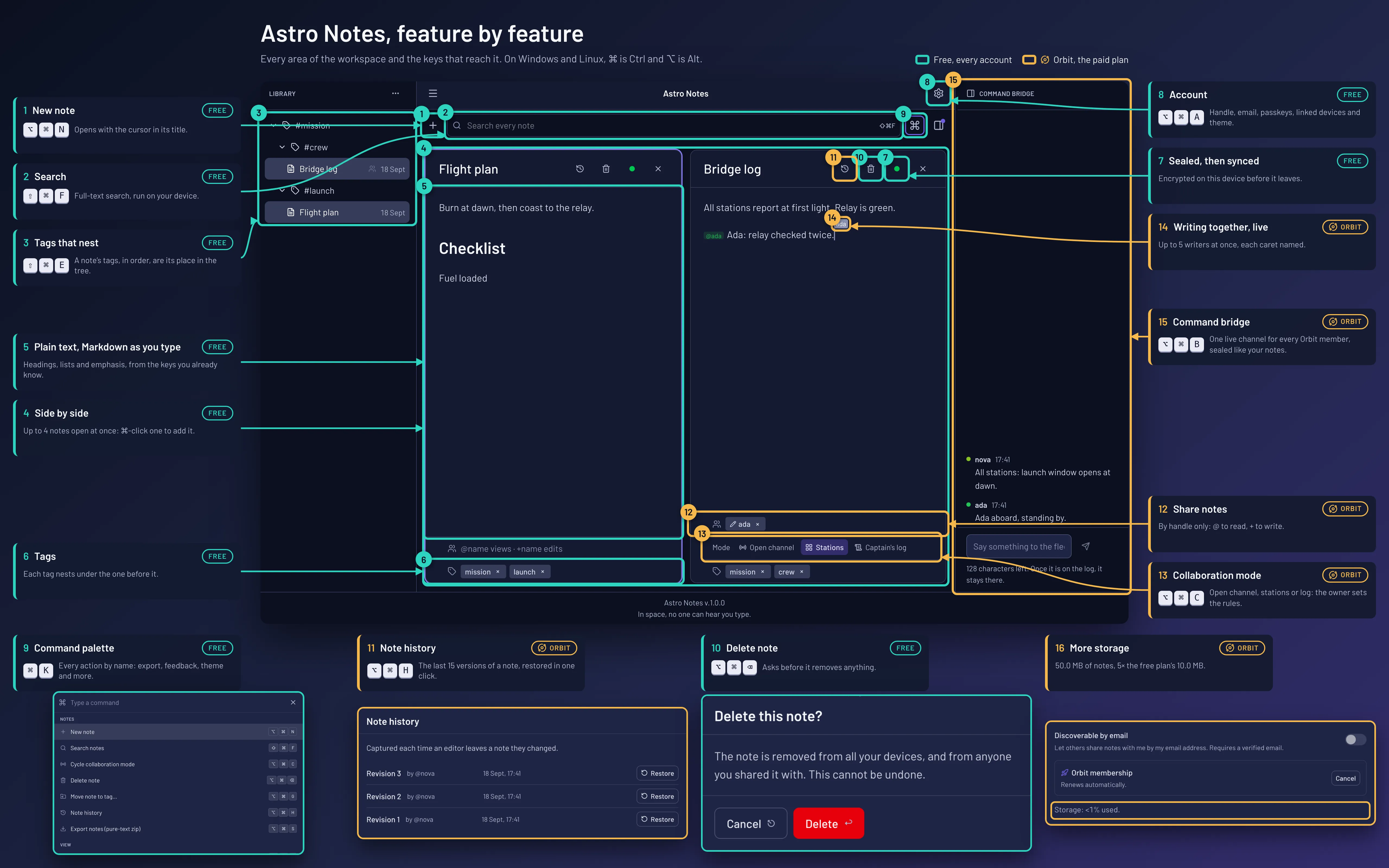
The map as a list, with every shortcut
- New note (free): Opens with the cursor in its title. ⌥⌘N
- Search (free): Full-text search, run on your device. ⇧⌘F
- Tags that nest (free): A note’s tags, in order, are its place in the tree. ⇧⌘E
- Side by side (free): Up to 4 notes open at once: ⌘-click one to add it.
- Plain text, Markdown as you type (free): Headings, lists and emphasis, from the keys you already know.
- Tags (free): Each tag nests under the one before it.
- Sealed, then synced (free): Encrypted on this device before it leaves.
- Account (free): Handle, email, passkeys, linked devices and theme. ⌥⌘A
- Command palette (free): Every action by name: export, feedback, theme and more. ⌘K
- Delete note (free): Asks before it removes anything. ⌥⌘⌫
- Note history (Orbit): The last 15 versions of a note, restored in one click. ⌥⌘H
- Share notes (Orbit): By handle only: @ to read, + to write.
- Collaboration mode (Orbit): Open channel, stations or log: the owner sets the rules. ⌥⌘C
- Writing together, live (Orbit): Up to 5 writers at once, each caret named.
- Command bridge (Orbit): One live channel for every Orbit member, sealed like your notes. ⌥⌘B
- More storage (Orbit): 50.0 MB of notes, 5× the free plan’s 10.0 MB.
Why Astro Notes →
Sign up with just a handle — an email address is optional.